SEO Audit Checklist: How to Find and Fix Issues Hurting Your Rankings
A complete SEO audit checklist covering technical SEO, on-page optimization, content quality, and backlink analysis. Follow this step-by-step guide to diagnose and fix issues holding your site back.
Atastic Team
Digital Marketing Agency
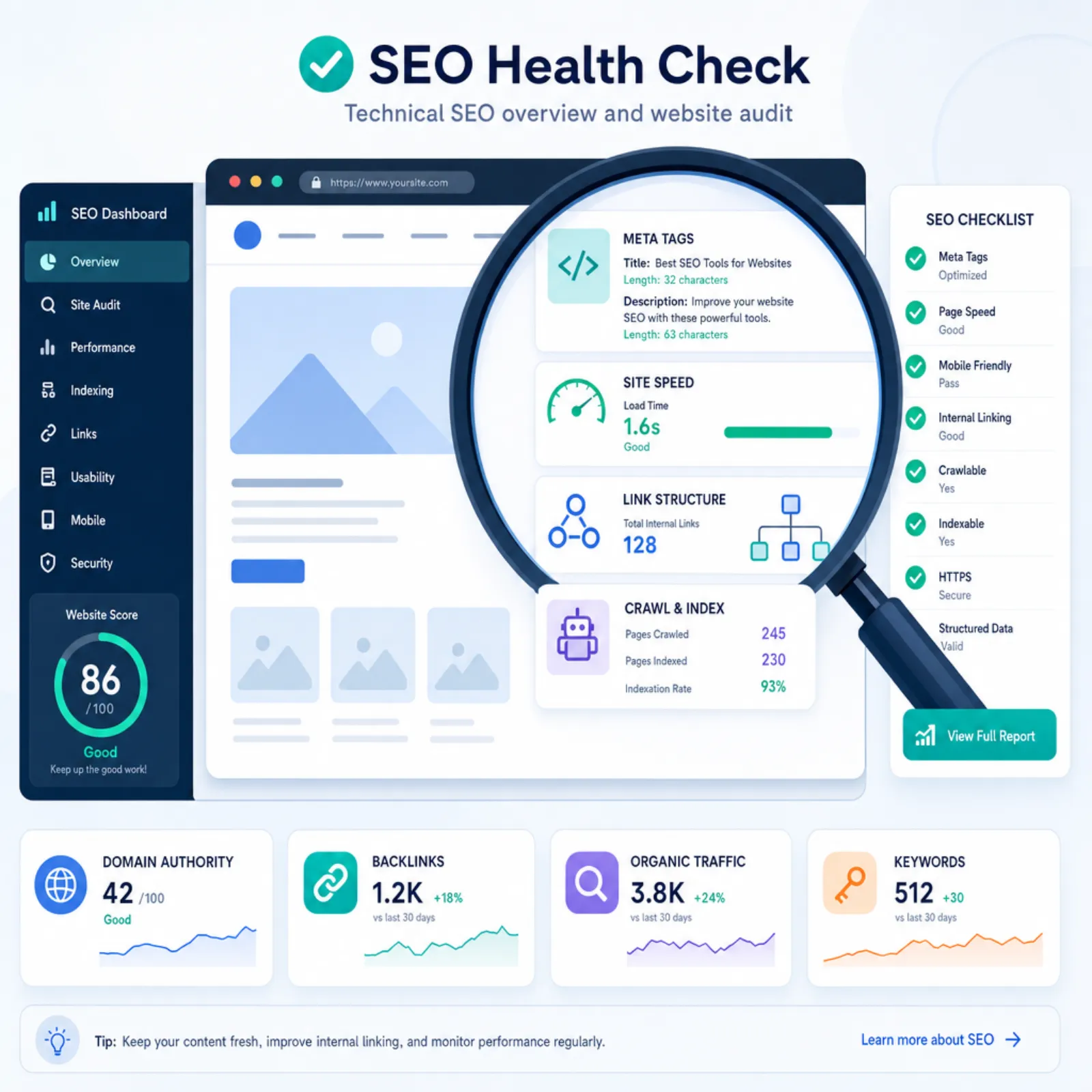
An SEO audit is a systematic evaluation of your website's search engine optimization. It identifies what's working, what's broken, and what opportunities you're missing. Think of it as a health check for your website's ability to attract organic traffic.
Whether your traffic has plateaued, dropped after a Google update, or you're launching a new site, a thorough SEO audit gives you a clear action plan. This checklist covers the four pillars of SEO: technical health, on-page optimization, content quality, and backlink profile.
Why Run an SEO Audit?
Sites accumulate SEO issues over time. Redesigns break internal links. Content becomes outdated. Technical problems creep in as developers ship features. Even well-maintained sites develop issues that silently erode their search performance.
A regular SEO audit (at minimum once per quarter) catches these problems before they compound. Here's what a thorough audit typically reveals:
- Technical errors that prevent Google from crawling and indexing your pages
- On-page optimization gaps that cost you rankings
- Content that has decayed in quality or relevance
- Backlink issues including toxic links or missed opportunities
- Core Web Vitals problems hurting user experience and rankings
Part 1: Technical SEO Audit
Technical SEO is the foundation. If Google can't crawl and index your pages properly, nothing else matters. Start here.
Crawlability
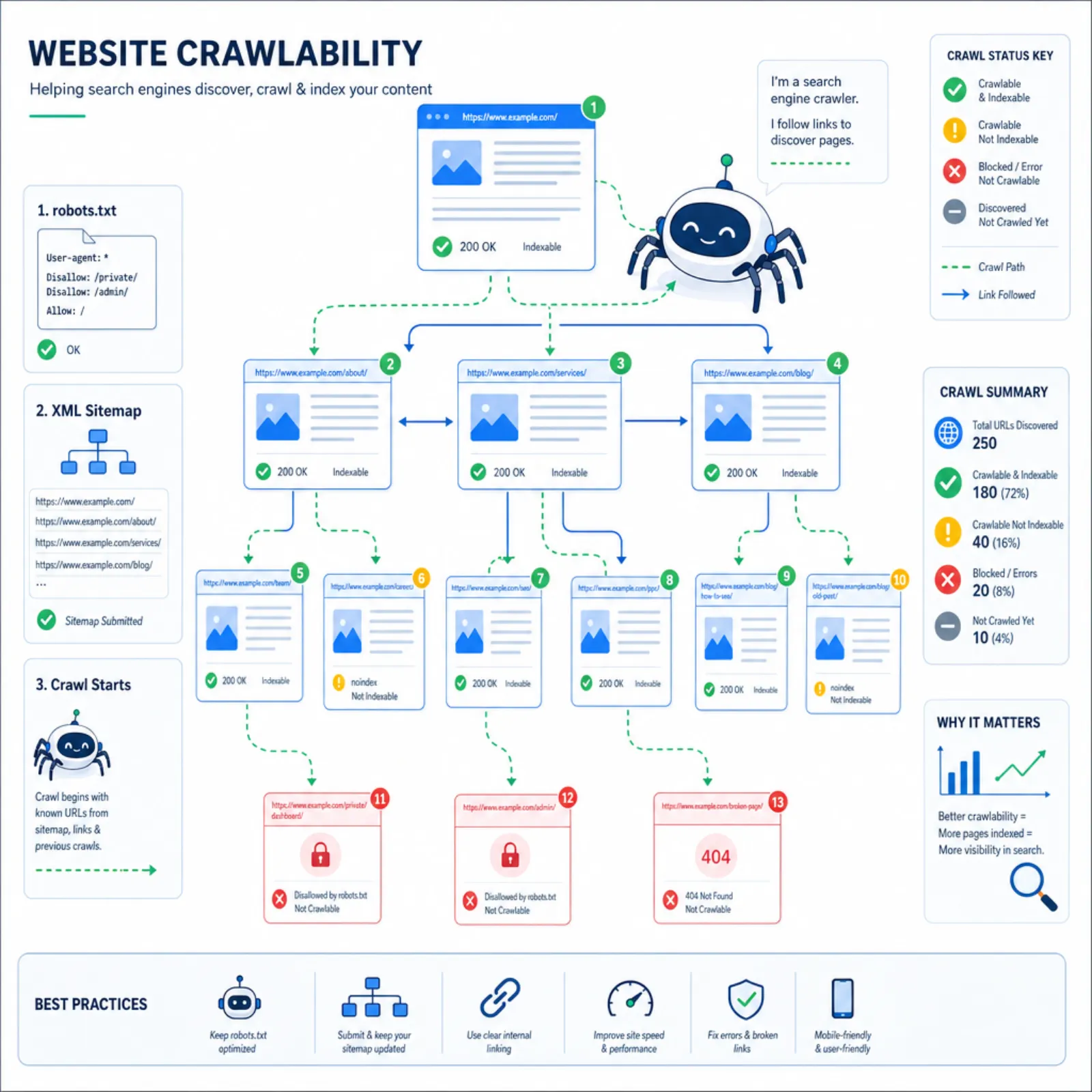
- Check robots.txt: Make sure you're not accidentally blocking important pages. Visit
yoursite.com/robots.txtand verify the directives. - Review your XML sitemap: Ensure it exists at
yoursite.com/sitemap.xml, contains only canonical URLs, excludes noindex pages, and is submitted to Google Search Console. - Check crawl errors: In Google Search Console, look at the Pages report for crawl errors, redirects, and blocked pages.
- Internal link structure: Every important page should be reachable within 3 clicks from the homepage. Orphan pages (with no internal links) won't get crawled reliably.
Indexation
- Index coverage: Compare the number of pages Google has indexed (via
site:yoursite.com) against your total page count. Large discrepancies indicate problems. - Noindex tags: Verify that pages you want indexed don't have accidental
noindexmeta tags or HTTP headers. - Canonical tags: Check that each page has a self-referencing canonical tag and that duplicate content has proper canonicals pointing to the preferred version.
- Duplicate content: Look for pages with identical or very similar content. URL parameters, trailing slashes, and www/non-www variations are common culprits.
Site Speed and Core Web Vitals
- Largest Contentful Paint (LCP): Should be under 2.5 seconds. Optimize images, use a CDN, and ensure fast server response times.
- Interaction to Next Paint (INP): Should be under 200ms. Minimize JavaScript execution time and reduce main thread blocking.
- Cumulative Layout Shift (CLS): Should be under 0.1. Set explicit dimensions on images and embeds. Avoid inserting content above existing content.
- Page speed: Run key pages through Google PageSpeed Insights and Lighthouse. Address critical issues first.
Mobile-Friendliness
- Responsive design: Test your site on multiple screen sizes. Google uses mobile-first indexing, so your mobile experience is what gets evaluated.
- Touch targets: Buttons and links should be at least 48x48 pixels with adequate spacing.
- Viewport configuration: Ensure your pages have a proper viewport meta tag.
HTTPS and Security
- SSL certificate: Your entire site should load over HTTPS with a valid certificate.
- Mixed content: Check for HTTP resources loaded on HTTPS pages (images, scripts, stylesheets).
- HTTP to HTTPS redirects: All HTTP URLs should 301 redirect to their HTTPS equivalents.
Part 2: On-Page SEO Audit
On-page SEO ensures each page is optimized for its target keywords and provides a clear signal to search engines about what the page covers.
Title Tags
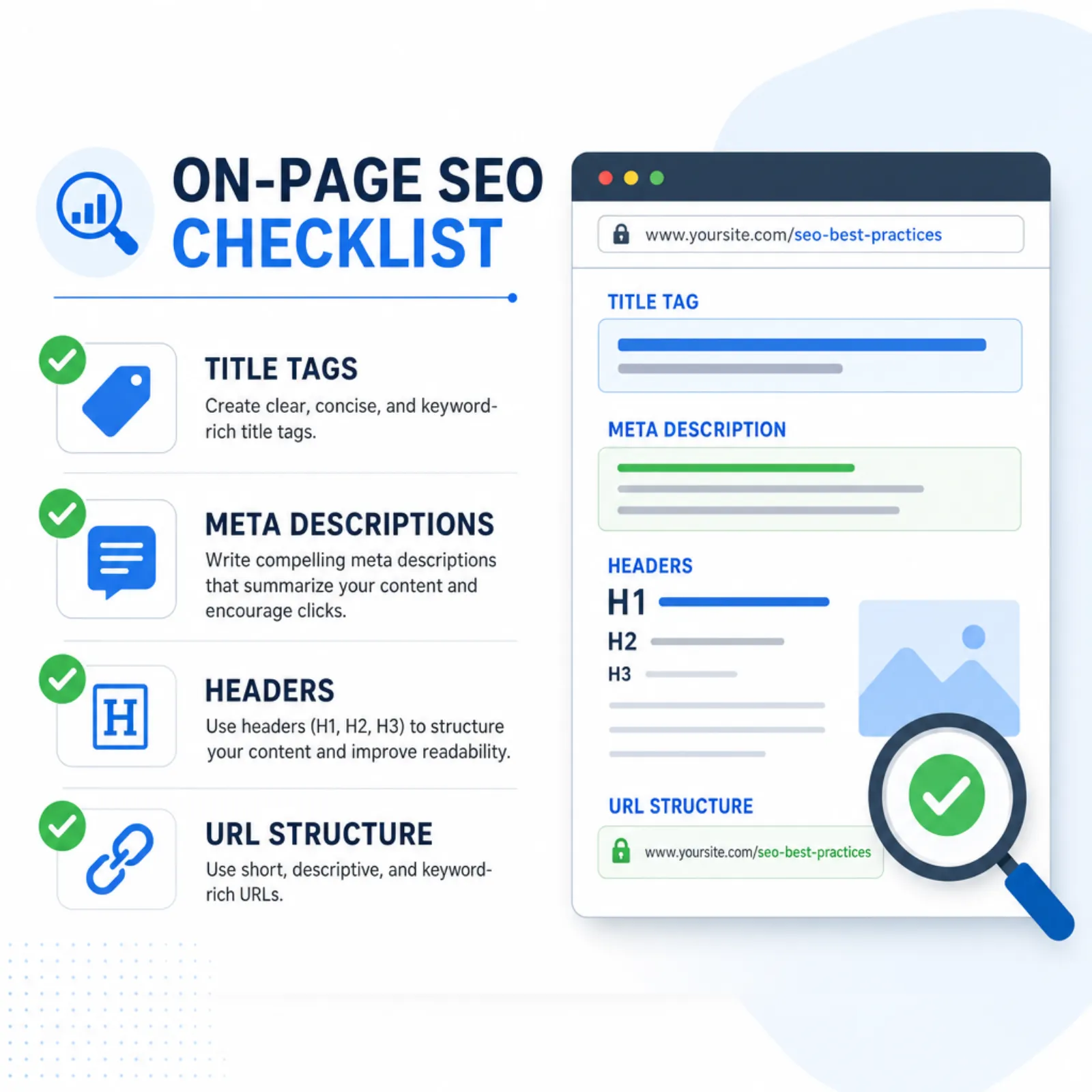
- Each page should have a unique, descriptive title tag
- Include your primary keyword naturally, preferably near the beginning
- Keep titles under 60 characters to avoid truncation in search results
- Make titles compelling, as they're your headline in search results
Meta Descriptions
- Write unique meta descriptions for every important page
- Include the target keyword and a clear call to action
- Keep them under 155 characters
- While not a direct ranking factor, good meta descriptions improve click-through rates
Header Structure
- Each page should have exactly one H1 tag containing the primary keyword
- Use H2s for main sections and H3s for subsections
- Headers should create a logical outline of the page content
- Include relevant keywords in headers where natural
URL Structure
- Keep URLs short, descriptive, and keyword-rich
- Use hyphens to separate words (not underscores)
- Avoid dynamic parameters in indexable URLs
- Maintain a logical hierarchy that reflects your site structure
Internal Linking
- Link to related content within your site using descriptive anchor text
- Important pages should have the most internal links pointing to them
- Fix any broken internal links (404 errors)
- Use a logical linking hierarchy: homepage → category pages → individual pages
Image Optimization
- Add descriptive alt text to all images
- Compress images to reduce file size without visible quality loss
- Use modern formats like WebP where browser support allows
- Set explicit width and height attributes to prevent layout shift
Part 3: Content Quality Audit
Google's helpful content system evaluates whether your content is genuinely useful to searchers. This part of the audit assesses content quality at scale.
Content Inventory
- Catalog all content: List every page along with its organic traffic, rankings, and last update date
- Identify thin content: Pages with fewer than 300 words or minimal unique value should be expanded, consolidated, or removed
- Find content decay: Pages that have lost significant traffic over the past 6-12 months need updating
- Check for cannibalisation: Multiple pages targeting the same keyword compete against each other. Consolidate or differentiate them
E-E-A-T Signals
Experience, Expertise, Authoritativeness, and Trustworthiness matter for ranking. Assess whether your content demonstrates:
- First-hand experience: Does the content include original insights, data, or real-world examples?
- Expertise: Are authors qualified to write about the topic? Do author bios reflect this?
- Authoritativeness: Is your site recognized as a credible source in your industry?
- Trustworthiness: Clear contact info, privacy policy, accurate information, proper citations
Search Intent Alignment
- For each target keyword, search it on Google and review the top results
- Does your content match the format and depth that's ranking? (listicle vs. guide vs. tool)
- Are you answering the actual question searchers have?
- Is your content more comprehensive and useful than what's currently ranking?
Part 4: Backlink Profile Audit
Backlinks remain one of the strongest ranking factors. A backlink audit evaluates the quality of your link profile and identifies opportunities.
Link Quality Assessment
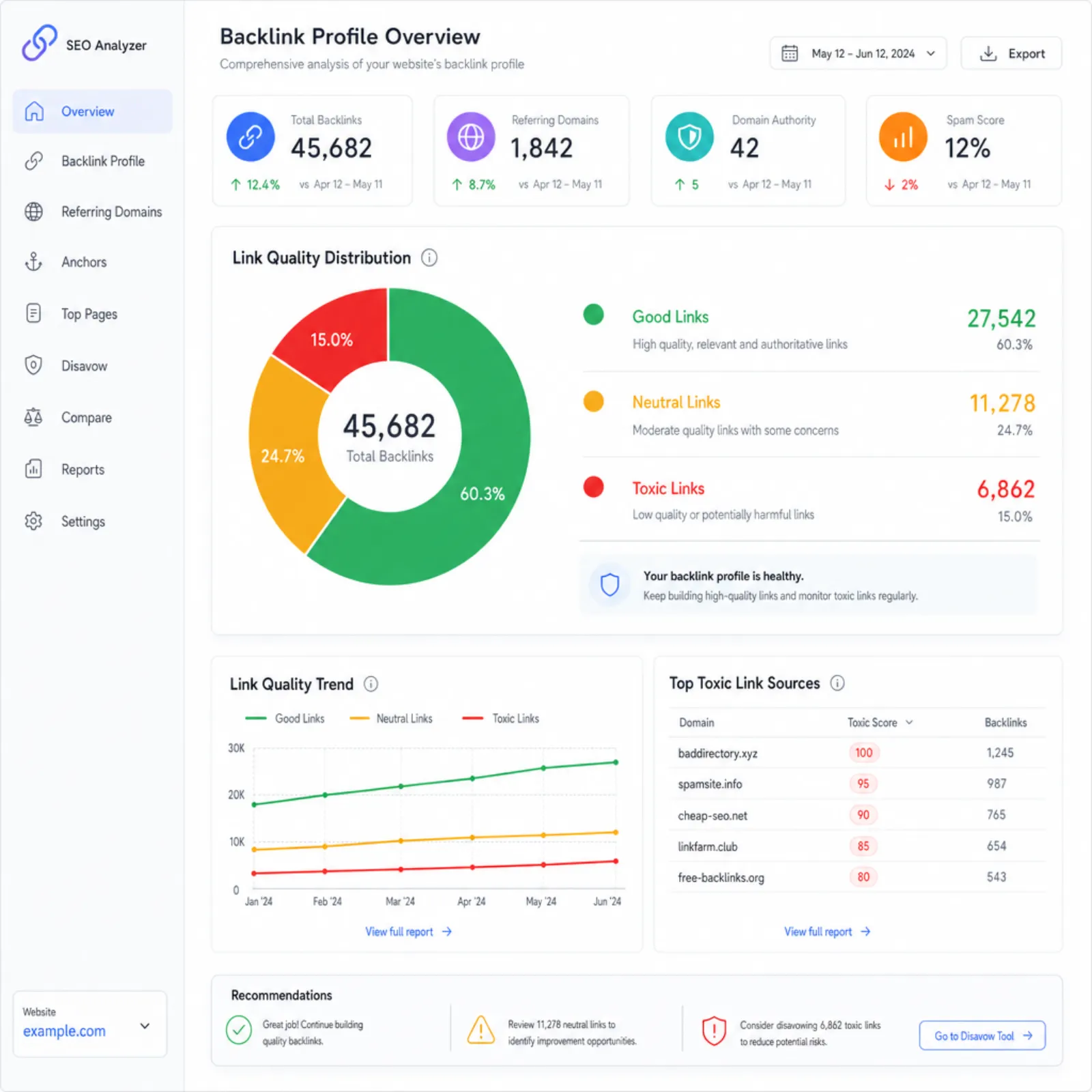
- Review referring domains: Use Ahrefs, Semrush, or Moz to export your full backlink profile
- Identify toxic links: Look for links from spammy, irrelevant, or PBN-type sites. Consider disavowing truly harmful links
- Check anchor text distribution: A natural profile has diverse anchor text. Heavy exact-match anchor text can trigger penalties
- Monitor lost links: Track valuable backlinks that have been removed and attempt to recover them
Competitive Gap Analysis
- Compare your backlink profile against top competitors
- Identify sites that link to competitors but not to you, as these are outreach targets
- Note the types of content that attract the most links in your niche
Prioritizing Your Fixes
After completing your SEO audit, you'll likely have a long list of issues. Prioritize by impact and effort:
- Critical (fix immediately): Pages blocked from indexing, site-wide technical errors, broken core functionality, security issues
- High impact (fix this week): Missing or duplicate title tags, major content gaps, slow page speed on key landing pages
- Medium impact (fix this month): Content updates, internal linking improvements, image optimization
- Low impact (ongoing): Minor meta description improvements, schema markup enhancements, small content tweaks
How Often Should You Audit?
A comprehensive SEO audit should happen quarterly. Between full audits, monitor these metrics weekly in Google Search Console:
- Crawl errors and index coverage changes
- Core Web Vitals scores
- Organic traffic trends
- Ranking changes for target keywords
Get a Professional SEO Audit
Running an SEO audit yourself is valuable, but a professional audit goes deeper. At Atastic, our SEO audit service includes automated crawl analysis, manual review by experienced consultants, competitive benchmarking, and a prioritized action plan tailored to your business goals.
Request a free SEO audit consultation to find out what's holding your site back.