Why Is My Website Traffic Dropping? 12 Causes and How to Diagnose Each One
Website traffic dropped suddenly? Here are 12 common causes, from algorithm updates to technical issues, and a diagnostic process to identify exactly what went wrong.
Atastic Team
Digital Marketing Agency
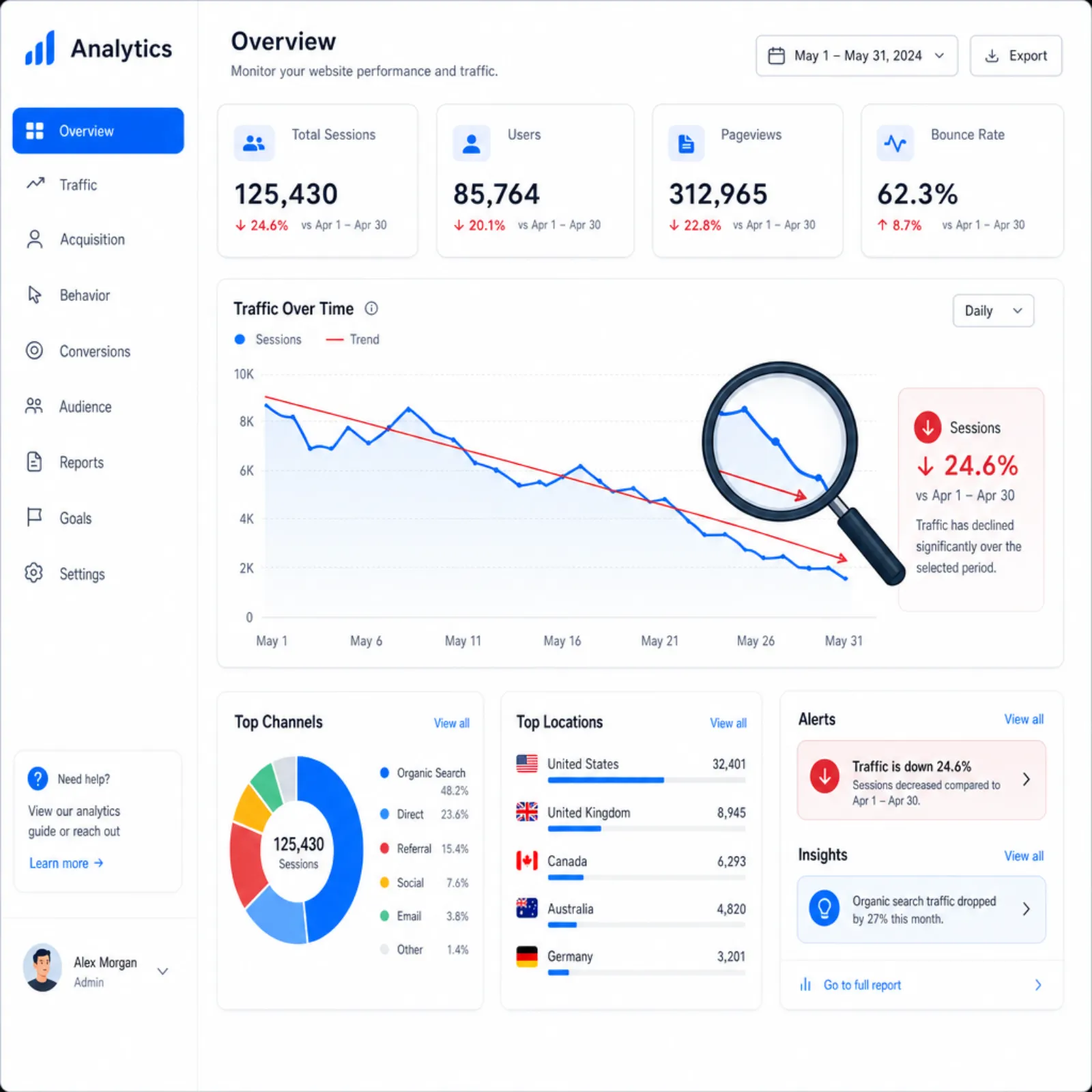
Few things are more alarming than watching your website traffic drop. Whether it happened overnight or has been declining gradually, a traffic loss can have a direct impact on leads, revenue, and business growth. The challenge is figuring out why it happened, because the cause determines the fix.
This guide covers the 12 most common reasons website traffic drops, how to diagnose which one is affecting you, and when it makes sense to bring in expert help. If you are staring at a downward-trending analytics chart right now, start here.
Step 1: Identify the Type of Traffic Drop
Before jumping to conclusions, you need to characterize the drop. Not all traffic declines are the same, and the pattern tells you a lot about the cause.
Sudden vs. Gradual Decline
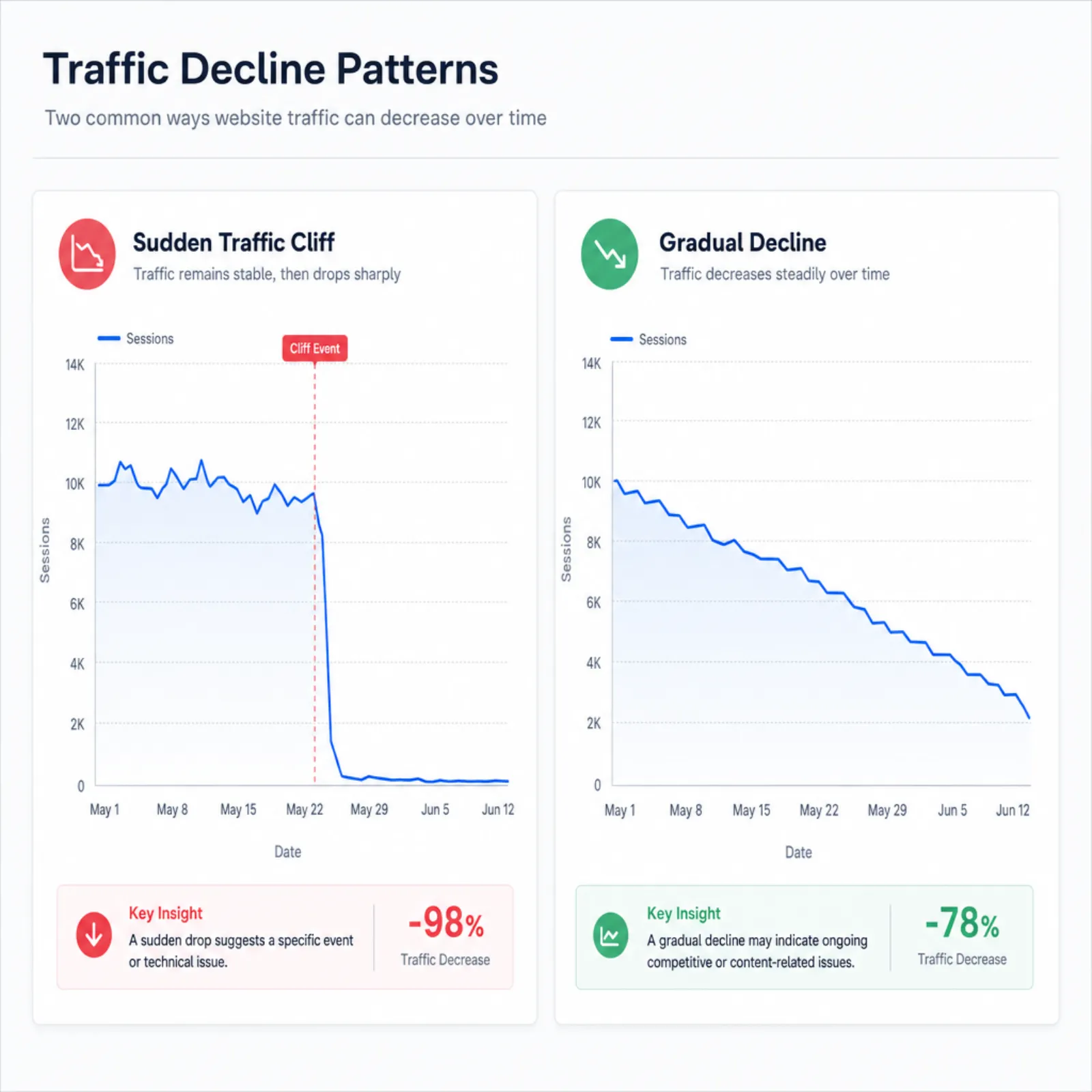
A sudden, sharp drop (traffic falls off a cliff on a specific date) points to a discrete event: an algorithm update, a technical change, a manual penalty, or a tracking issue. You can usually pinpoint the exact date and work backward to find the cause.
A gradual decline over weeks or months suggests something systemic: content decay, increasing competition, slow erosion of backlinks, or shifting search intent. These are harder to diagnose because there is no single trigger.
Which Traffic Source Dropped?
Check Google Analytics to determine which source is responsible for the decline:
- Organic search: Points to SEO issues, algorithm updates, or content problems
- Direct traffic: Could indicate brand issues, tracking changes, or seasonal patterns
- Referral traffic: A referring site may have removed your links or changed their content
- Paid traffic: Budget changes, paused campaigns, or ad platform policy issues
- Social traffic: Algorithm changes on social platforms, reduced posting frequency, or content performance shifts
If organic search is the source of the decline, the rest of this article will help you diagnose the cause. If the drop is in paid or social traffic, the issue likely lies in those specific channels rather than your website itself.
Is It a Tracking Issue?
Before assuming real traffic is lost, verify that your analytics tracking is working correctly. A broken tracking script can make it look like traffic disappeared when nothing actually changed. Check:
- Is your Google Analytics tracking code present on all pages?
- Did someone recently update the website theme, CMS, or tag manager configuration?
- Are there any filters in your analytics view that might be excluding traffic?
- Does Google Search Console show a similar decline in impressions and clicks?
If Search Console shows stable or growing impressions but Analytics shows a drop, the problem is almost certainly a tracking issue, not a real traffic decline.
12 Common Causes of Traffic Drops
Once you have established that the traffic drop is real and identified the affected source, work through these common causes to find your culprit.
1. Google Algorithm Update
Google makes thousands of algorithm adjustments annually, with several major core updates per year. If your traffic dropped around the same time as a confirmed Google update, the update is the likely cause.
How to check: Search for "Google algorithm update" followed by the month and year of your traffic drop. Google announces major updates on their Search Central blog. Third-party tools like Semrush Sensor and Moz also track algorithm volatility.
What to do: Analyze which pages lost the most traffic and rankings. Look for patterns. Did product pages drop? Blog posts? Landing pages? Algorithm updates often target specific content quality issues. Run your key pages through an E-E-A-T analysis to evaluate how Google might perceive your content quality.
2. Technical SEO Issues
Technical problems can prevent Google from crawling, indexing, or ranking your pages. Common technical culprits include:
- Accidental noindex tags on important pages
- Robots.txt blocking critical sections of the site
- Server errors (500 status codes) preventing pages from loading
- Broken internal links creating crawl dead ends
- Dramatic page speed degradation
- Mobile usability problems
How to check: Review Google Search Console's "Pages" report for indexing issues. Check the "Core Web Vitals" report for performance problems. Run a crawl with a tool like Screaming Frog or Sitebulb to identify technical errors at scale. Our on-page analysis tool can also help identify page-level issues.
What to do: Fix the technical issues in order of severity. Noindex tags on important pages and server errors are emergencies. Page speed and mobile issues are urgent but less immediately catastrophic.
3. Content Decay
Content that once ranked well can lose its edge over time. Competitors publish better, more current content. The information in your pages becomes outdated. User expectations evolve. This is especially common with date-sensitive topics and rapidly changing industries.
How to check: In Google Search Console, look at which pages have declined in average position over the past 6 to 12 months. Compare your content to what currently ranks on page one for those keywords.
What to do: Refresh and update declining content. Add new information, improve depth and accuracy, update examples and statistics, and optimize for current search intent. Content refreshes are one of the highest-ROI SEO activities because you are improving pages that already have authority rather than starting from scratch.
4. Lost Backlinks
Backlinks from other websites are a major ranking factor. If authoritative sites remove links to your content, your rankings can decline as a result.
How to check: Use a backlink analysis tool (Ahrefs, Semrush, Moz) to review your backlink profile for recently lost links. Focus on links from high-authority domains.
What to do: Reach out to sites that removed your links to understand why and request reinstatement. Build new links to affected pages through content promotion, digital PR, and outreach. Diversify your link building so you are not dependent on a small number of referring domains.
5. Website Migration or Redesign
Site migrations (changing domains, moving to HTTPS, redesigning URL structures, switching CMS platforms) are one of the most common causes of traffic drops. Even well-planned migrations can cause temporary traffic loss. Poorly planned ones can be devastating.
How to check: Did the traffic drop coincide with any changes to your URL structure, domain, hosting, or CMS? Check Google Search Console for crawl errors, 404 pages, and redirect chains.
What to do: Verify that all old URLs properly redirect (301) to their new equivalents. Fix any 404 errors on pages that previously received traffic. Submit an updated sitemap to Google Search Console. If the migration introduced structural issues, you may need a comprehensive technical SEO review to identify and fix all the problems.
6. Manual Penalty (Manual Action)
Google can manually penalize your site for violating their webmaster guidelines. This is different from an algorithmic adjustment. Manual penalties are deliberate actions taken by a Google reviewer.
How to check: Go to Google Search Console and check the "Manual actions" section under "Security & Manual Actions." If there is a manual action, Google will specify the issue.
What to do: Fix the specific violation (unnatural links, thin content, cloaking, etc.) and submit a reconsideration request through Search Console. Manual penalties can be resolved, but it requires addressing the issue thoroughly and demonstrating compliance.
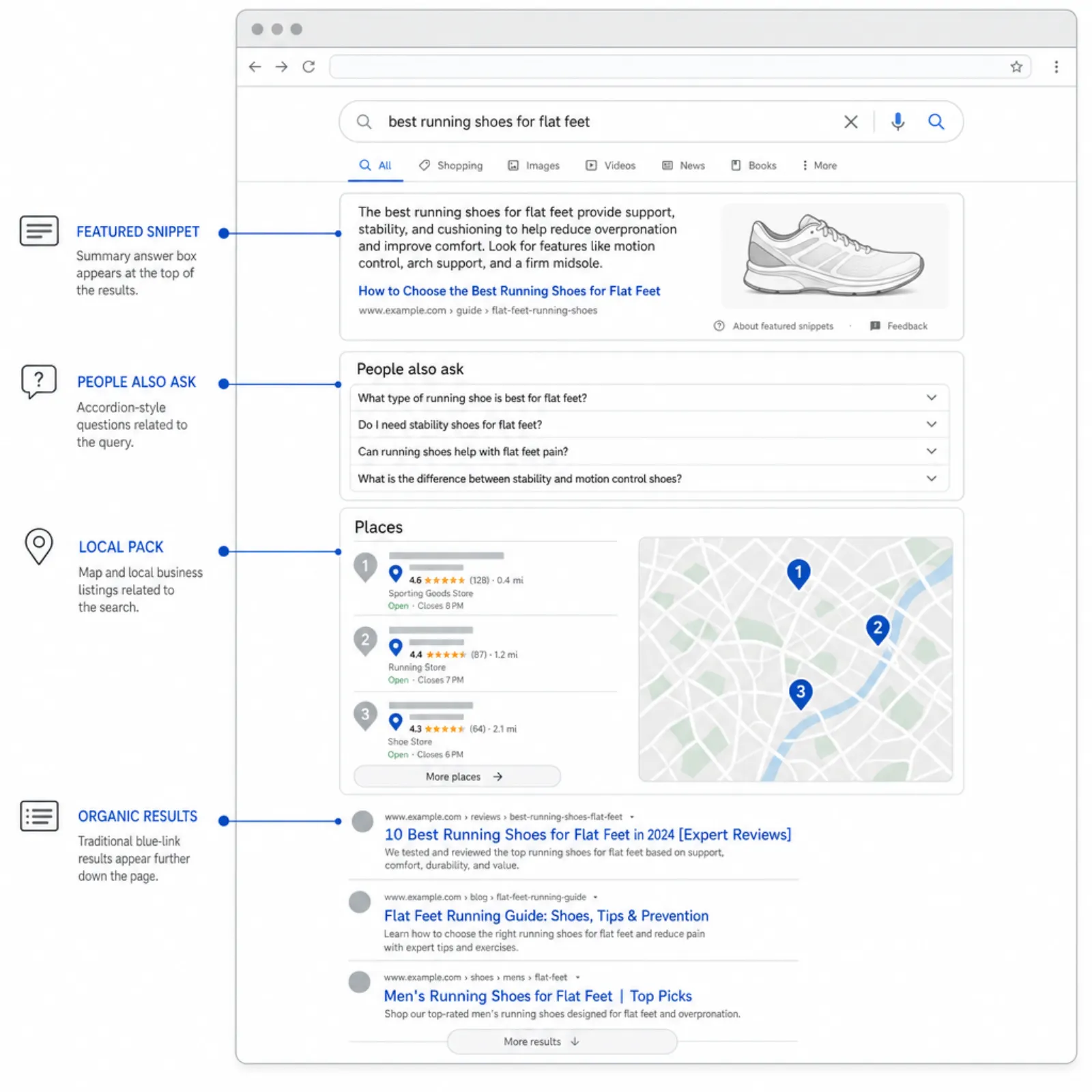
7. Increased Competition
Sometimes your traffic drops not because you did something wrong, but because competitors did something right. New competitors entering the market, existing competitors investing heavily in content and SEO, or a shift in Google's preference toward different types of content can all push your rankings down.
How to check: Search for your target keywords and see who is ranking above you. Are there new competitors? Has existing content improved significantly? Are there new SERP features (featured snippets, People Also Ask) that are reducing clicks to organic results?
What to do: Analyze what the competition is doing better. Improve your content, build more authoritative backlinks, and ensure your technical SEO is superior. Competing effectively requires understanding what Google now considers the best result for each query.
8. Search Intent Shift
Google's understanding of what users want for a given query evolves. A keyword that previously returned informational blog posts might now show product pages or comparison tools. If the intent shifts and your content no longer matches, your rankings will decline even if your content quality is unchanged.
How to check: Search your target keywords and study the current top 10 results. What type of content dominates? Blog posts? Product pages? Videos? Tools? Compare that to what you are offering.
What to do: Align your content with the current search intent. This might mean restructuring a blog post into a comparison guide, adding interactive elements, or creating an entirely new page type that matches what Google now prefers for that query.
9. Seasonality
Many industries and topics have natural seasonal patterns. E-commerce traffic peaks in November and December. Tax-related searches spike in spring. Travel queries surge before summer. If your traffic drop aligns with predictable seasonal patterns, it may not indicate a problem at all.
How to check: Compare your current traffic to the same period last year, not just to the previous month. Use Google Trends to check seasonal patterns for your primary keywords.
What to do: If the drop is seasonal, there is nothing to fix. Plan ahead for seasonal fluctuations and use quieter periods to build content and technical improvements that will compound during peak seasons.
10. Keyword Cannibalization
Keyword cannibalization occurs when multiple pages on your site target the same keyword. Instead of one strong page ranking well, Google gets confused about which page to rank and may rank neither one effectively.
How to check: In Google Search Console, look for keywords where multiple pages from your site appear in the results or where the ranking page keeps changing. Search for your target keywords with `site:yourdomain.com` to see how many pages Google considers relevant.
What to do: Consolidate competing pages by merging the best content into a single, authoritative page. Redirect the other pages to the consolidated version. Ensure each target keyword has one clear, designated page on your site.
11. Tracking and Measurement Errors
As mentioned earlier, tracking issues can create the illusion of a traffic drop. Beyond broken tracking codes, other measurement problems include:
- Consent management platforms (cookie banners) blocking analytics scripts for users who do not consent, which creates an apparent traffic decline as privacy regulations tighten
- Ad blockers preventing analytics scripts from loading
- Changes to UTM parameters or campaign tracking that reclassify traffic between sources
- Migration from Universal Analytics to GA4 without proper configuration
How to check: Compare data across multiple sources. If Search Console shows stable impressions and clicks but GA4 shows declining sessions, the issue is likely tracking-related. Check your real-time report to confirm the tracking code is firing.
What to do: Fix the tracking implementation. If consent management is the issue, consider server-side tracking or cookieless analytics solutions that provide more complete data while respecting privacy regulations.
12. Changes to Paid Campaigns
If you recently reduced paid advertising spend, paused campaigns, or changed targeting, the decline might appear in your overall traffic numbers. Additionally, running paid campaigns on branded keywords can sometimes cannibalize organic branded clicks, and pausing those campaigns shifts clicks back to organic, but the net traffic may decrease if the paid campaigns were also driving incremental visits.
How to check: Review your paid media dashboard alongside organic traffic data. Did changes to paid campaigns coincide with the traffic drop? Look at branded vs. non-branded traffic separately.
What to do: Analyze the interplay between paid and organic traffic for your brand terms. Ensure changes to paid strategy account for the impact on overall traffic. Work with your paid media team and SEO team together to avoid unintended traffic cannibalization.
How to Diagnose Your Traffic Drop
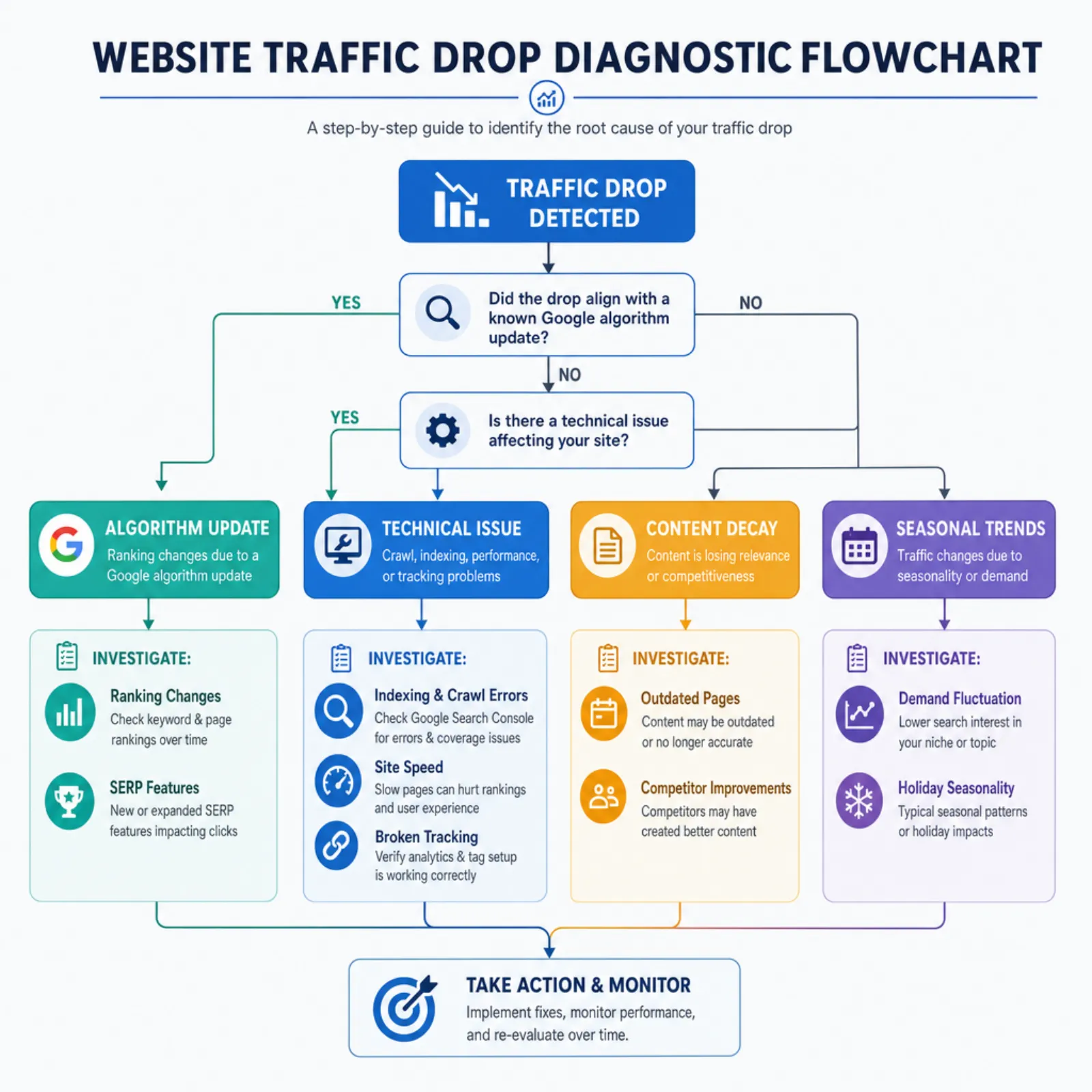
Follow this systematic 7-step process to identify the cause of your traffic decline:
- Verify tracking: Confirm your analytics code is firing correctly on all pages. Check real-time reports and compare with Search Console data.
- Identify the affected source: Is it organic, paid, referral, direct, or social? Narrow your investigation to the right channel.
- Check the timeline: When exactly did the drop start? Look for events that coincide: algorithm updates, site changes, campaign modifications.
- Identify affected pages: Is the decline site-wide or concentrated on specific pages, sections, or topics? Use Search Console's performance report filtered by page.
- Check for technical issues: Review Search Console for indexing problems, crawl errors, and Core Web Vitals issues. Run a technical crawl of your site.
- Analyze the competitive landscape: Search your top keywords manually. Has the SERP changed? Are new competitors ranking? Has search intent shifted?
- Review your backlink profile: Check for significant lost links from authoritative domains in the period leading up to the decline.
Document your findings at each step. In most cases, the cause becomes clear by step 4 or 5. If multiple factors are at play (which is common), prioritize fixes based on potential impact.
When to Get Expert Help
Some traffic drops are straightforward to diagnose and fix. A broken tracking code or an accidental noindex tag is easy to identify if you know where to look. But other situations warrant professional assistance:
- The cause is unclear after your initial diagnosis: If you have worked through the steps above and still cannot identify the problem, an experienced SEO team can bring fresh perspective and deeper analysis tools.
- The drop is significant and impacting revenue: When traffic declines translate to material revenue loss, speed matters. An agency with experience diagnosing traffic issues can often identify the cause in days rather than weeks.
- You were hit by an algorithm update: Recovering from a core algorithm update requires a strategic approach to content quality, E-E-A-T signals, and technical optimization. This is not a quick fix and benefits from experienced guidance.
- A site migration went wrong: Botched migrations can have dozens of interrelated issues. Untangling them systematically requires technical SEO expertise.
- You need an objective assessment: Internal teams can develop blind spots about their own content and website quality. An external SEO audit provides an honest evaluation.
Start with a quick diagnostic using our free E-E-A-T analysis tool to assess your content quality signals. For a comprehensive audit and recovery plan, check out our SEO audit checklist or contact the Atastic team directly. We will help you identify what went wrong and build a plan to recover and grow.