Conversion Rate Optimization: The Complete Guide to Converting More Visitors
Learn how conversion rate optimization works and how to apply it to your website. Covers testing methodology, high-impact page elements, tools, and common CRO mistakes to avoid.
Atastic Team
Digital Marketing Agency
Conversion rate optimization (CRO) is the practice of increasing the percentage of website visitors who take a desired action, whether that's making a purchase, filling out a form, or signing up for a trial. Instead of driving more traffic, CRO makes your existing traffic more valuable.
Consider this: if your website converts at 2% and you increase that to 3%, you've grown revenue by 50% without spending a single additional dollar on advertising. That's the power of conversion rate optimization.
What Is Conversion Rate and How Is It Calculated?
Your conversion rate is the number of conversions divided by the number of visitors, expressed as a percentage.
Conversion Rate = (Conversions / Total Visitors) x 100
For example, if 10,000 people visit your landing page and 300 fill out your form, your conversion rate is 3%.
What Counts as a Conversion?
A conversion is any action you want visitors to take. Common conversions include:
- Completing a purchase
- Submitting a contact or lead form
- Starting a free trial
- Subscribing to an email list
- Downloading a resource
- Booking a demo or consultation
Your website likely has multiple conversion types. Track them separately. The optimization approach differs for each.
Average Conversion Rates by Industry
Before optimizing, establish a baseline. Here are approximate average conversion rates across industries:
- E-commerce: 2.5-3%
- B2B SaaS: 3-5% (free trial signups)
- Lead generation: 2.5-5%
- Financial services: 5-6%
- Healthcare: 3-4%
These are averages. Top performers in every industry convert at 2-3x these rates. The gap between average and excellent is where CRO creates the most value.
The CRO Process: A Data-Driven Framework
Conversion rate optimization isn't guesswork. It follows a systematic process of research, hypothesis, testing, and iteration.
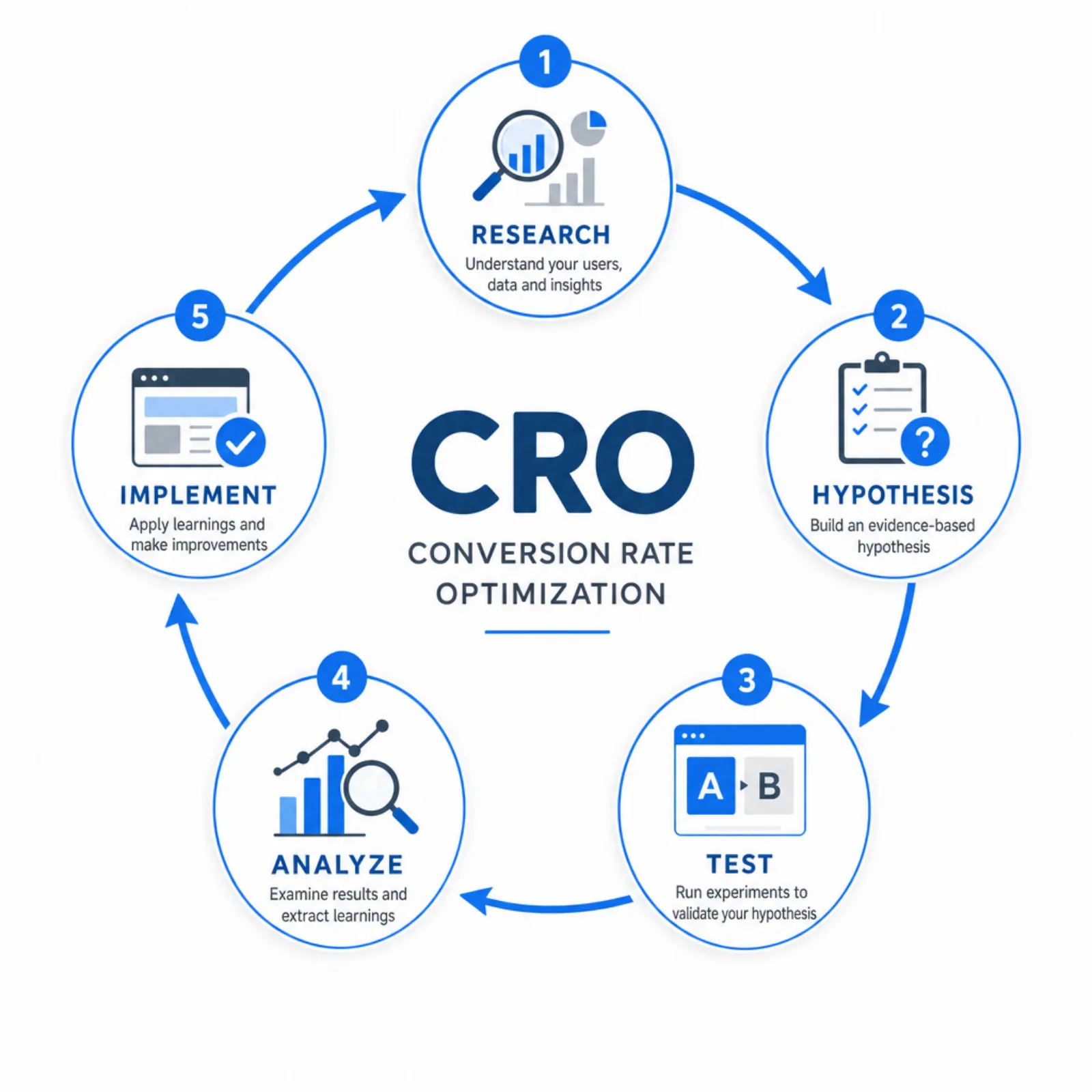
Step 1: Collect Data
Before changing anything, understand how visitors currently behave on your site.
Quantitative data (what's happening):
- Google Analytics: Page-level conversion rates, drop-off points, traffic sources
- Funnel analysis: Where exactly are people leaving the conversion process?
- Form analytics: Which fields cause abandonment?
Qualitative data (why it's happening):
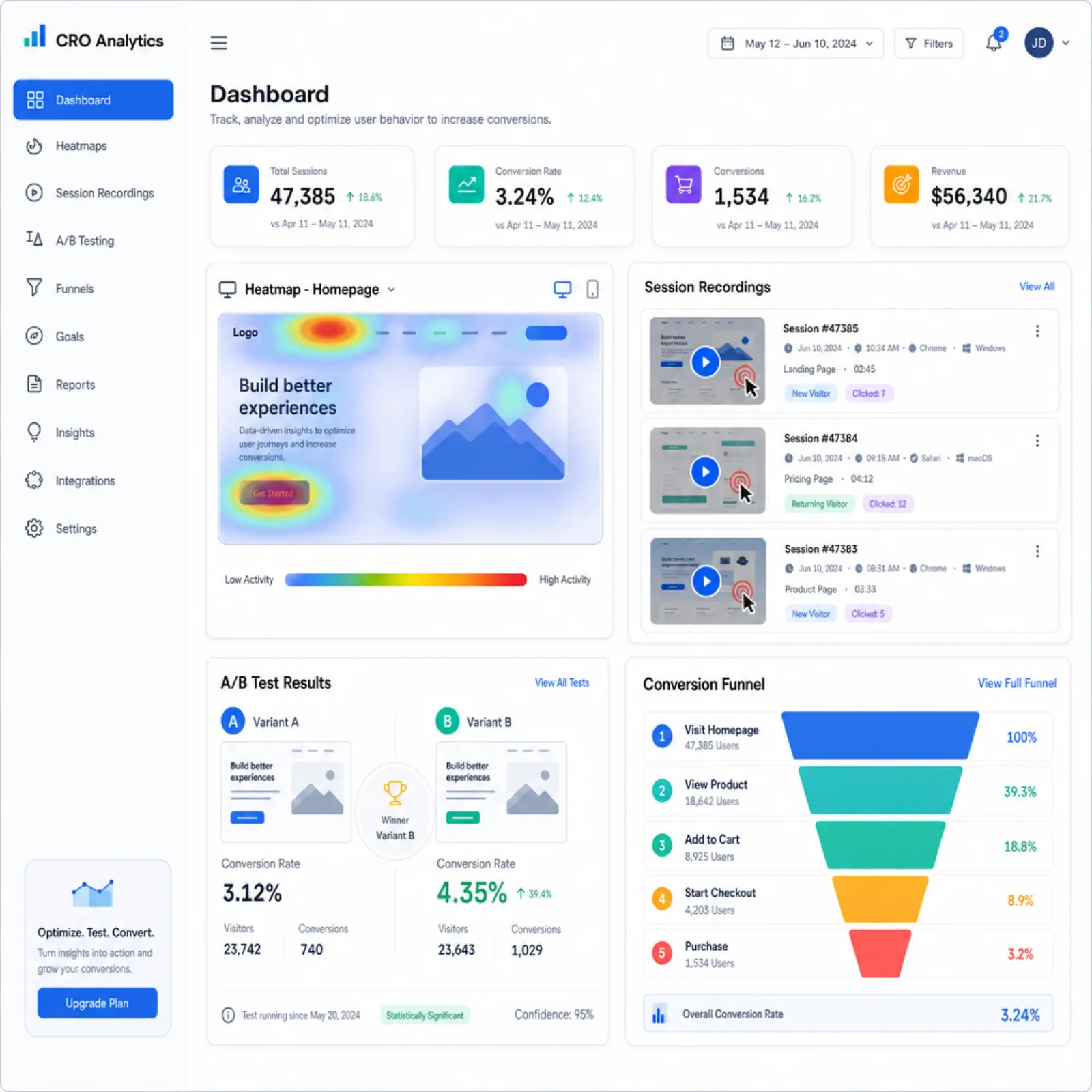
- Session recordings: Watch real users navigate your site (tools: Hotjar, FullStory)
- Heatmaps: See where people click, scroll, and spend time
- User surveys: Ask visitors what's preventing them from converting
- Usability testing: Watch 5-10 people attempt to complete key tasks
Set up proper analytics tracking before starting any CRO work. You need accurate data to measure improvements.
Step 2: Identify Problems and Opportunities
With data in hand, look for patterns:
- High-traffic, low-conversion pages: These represent the biggest opportunities
- Funnel drop-off points: Where are people leaving the conversion process?
- Device-specific issues: Is mobile converting significantly worse than desktop?
- Source-specific problems: Do certain traffic sources convert much worse?
Step 3: Form Hypotheses
A proper CRO hypothesis follows this format:
"If we [make this specific change], then [this metric will improve], because [this is what the data tells us about the problem]."
Example: "If we reduce the contact form from 8 fields to 4, then form submissions will increase by 20%, because our form analytics show 45% of users abandon after the fourth field."
Step 4: Test
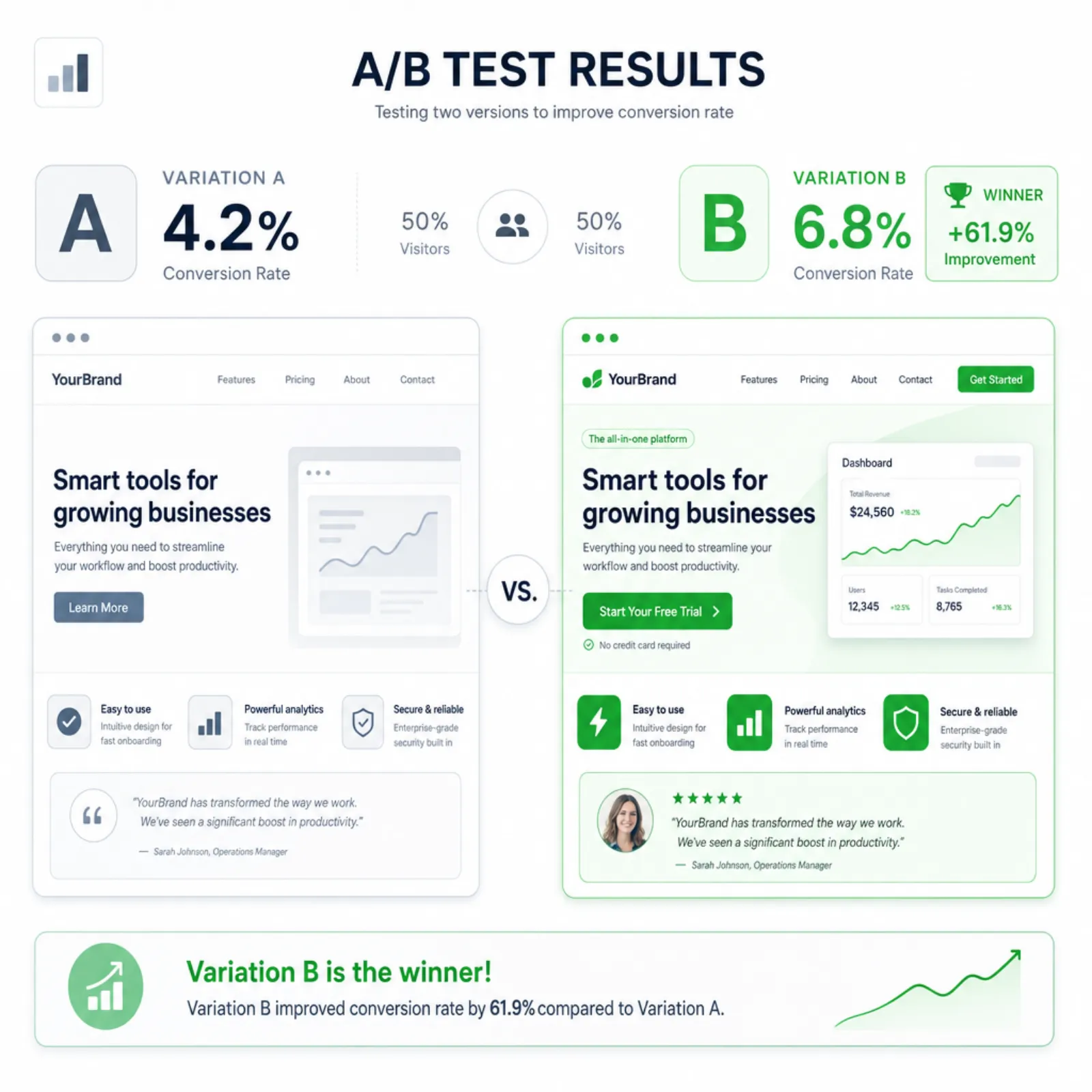
A/B testing is the gold standard for validating CRO hypotheses. Show version A (control) to half your visitors and version B (variation) to the other half, then measure which converts better.
Key testing principles:
- Test one variable at a time. Otherwise you won't know what caused the change
- Run tests to statistical significance. Don't call a winner after 50 visits. Most tests need 1,000+ visitors per variation
- Set a minimum duration. Run tests for at least 2 full business cycles (usually 2-4 weeks) to account for daily and weekly variation
- Define success criteria upfront. Decide what improvement is meaningful before launching the test
Step 5: Implement and Iterate
Winners get implemented permanently. Losers provide learning. Either way, document results and move to the next hypothesis. CRO is a continuous process, not a one-time project.
High-Impact CRO Areas
Not every optimization is equal. Focus on these areas first for maximum impact.
Landing Pages
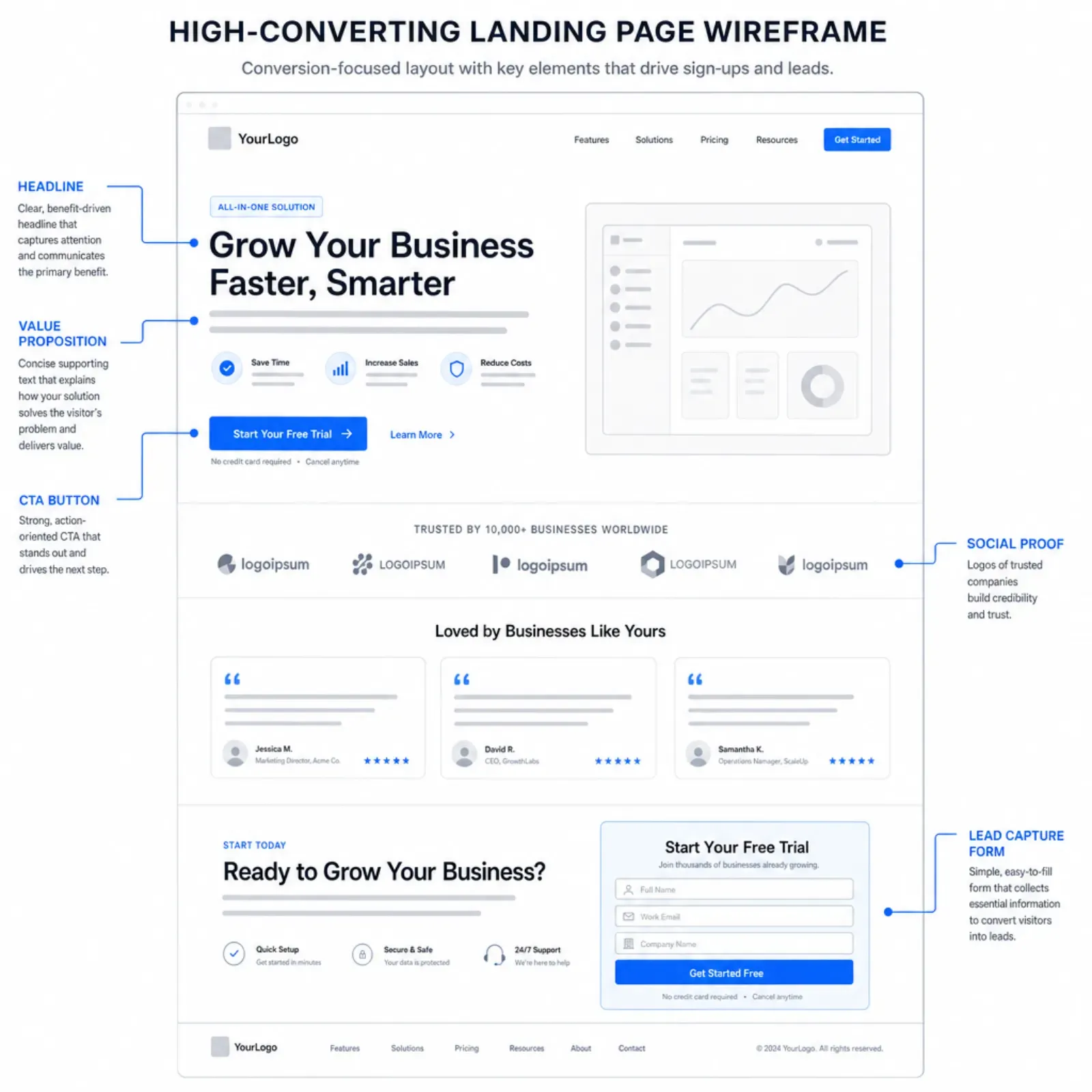
Landing pages are purpose-built for conversion. Key elements to optimize:
- Headline: Your headline is the first thing visitors see. It should communicate value clearly and match the ad or link that brought them there.
- Value proposition: Within 5 seconds, can a visitor understand what you offer, who it's for, and why they should care?
- Call to action (CTA): Make it prominent, specific, and benefit-oriented. "Get my free audit" converts better than "Submit."
- Social proof: Testimonials, logos, case studies, and numbers that build credibility.
- Form design: Ask only for information you genuinely need. Every additional field reduces conversions.
Product and Pricing Pages
- Make pricing transparent. Hidden pricing frustrates buyers
- Highlight the most popular plan visually
- Address common objections near the pricing table
- Include a clear comparison between tiers
Checkout and Forms
- Remove navigation and distractions from checkout pages
- Show a progress indicator for multi-step forms
- Offer guest checkout options
- Display security badges and trust signals near payment fields
- Save form progress so users can return
Website-Wide Elements
- Page speed: A 1-second delay in page load time can reduce conversions by 7%. Optimize your technical performance.
- Navigation: Make it easy to find what visitors are looking for
- Mobile experience: Over 60% of traffic is mobile. If your mobile experience is poor, you're losing most of your potential conversions.
- Trust signals: SSL certificate, clear contact information, privacy policy, return policy, security badges
CRO Tools
You don't need an expensive stack to start. Here's a practical toolkit:
- Analytics: Google Analytics 4 (free)
- Heatmaps and recordings: Hotjar (free tier available), Microsoft Clarity (free)
- A/B testing: Google Optimize (free), VWO, Optimizely
- Surveys: Hotjar surveys, Typeform
- Form analytics: Hotjar, Formisimo
Common CRO Mistakes
Avoid these pitfalls that undermine conversion optimization efforts:
- Testing without data. Random changes aren't optimization. Let quantitative and qualitative data guide your hypotheses.
- Ending tests too early. A/B tests need statistical significance. An early "winner" might just be noise.
- Optimizing for the wrong metric. Increasing form submissions means nothing if the leads are unqualified. Optimize for business outcomes, not vanity metrics.
- Copying competitors. What works for them might not work for you. Their audience, brand, and traffic sources are different. Test for yourself.
- Ignoring mobile. Desktop and mobile users behave differently. Optimize for both.
- Making too many changes at once. A complete redesign might improve conversions, but you won't know why. Incremental changes produce learnings you can build on.
When to Start CRO
CRO makes the most impact when:
- You have at least 1,000 monthly visitors (enough traffic to run meaningful tests)
- You have conversion tracking properly set up
- Your traffic is relatively stable (not wildly fluctuating)
- You've addressed basic usability issues (the site works and loads fast)
If your traffic is very low, focus on building traffic first through your digital marketing strategy. CRO amplifies existing traffic. It can't create traffic from nothing.
Getting Started with CRO
You don't need a dedicated CRO team to start. Begin with these high-impact actions:
- Set up Google Analytics 4 and configure conversion tracking
- Install a heatmap tool on your top 5 pages
- Review your data and identify one high-traffic, low-conversion page
- Form a hypothesis based on the data
- Run your first A/B test
If you want expert help, our conversion rate optimization services can identify and implement the changes that will have the biggest impact on your bottom line. Contact us to discuss your conversion goals.